Early-bird pricing: 100 of 100 left at $14.99, then $29.99. FirstTake is $14.99, one time. No subscription.

New The AI film studio for Mac

Make AI films,
not just clips.

Plan an episode with an AI director. Generate every scene with Seedance, Kling, Veo and more. FirstTake carries each shot into the next, keeps every character's voice, and exports one finished film.

One-time purchase · 3-day free trial, no card · macOS 12+ · Apple silicon & Intel

The FirstTake editor with the short film Paper Boat: its seven scenes down the left, a paper boat riding a rainy gutter on the stage, the narrator's line on the timeline, and the scene's prompt, continuity frame, Kling 3.0 Pro and a $0.56 Regenerate button on the right.
The editor, with a real project. The picture is the scene's actual take.

Runs the models you already know, through fal.ai, OpenRouter or Higgsfield

Seedance 2.5, Kling 3.0, Veo 3.1, MiniMax H3, Wan 2.5, PixVerse V6, Nano Banana, Seedream, FLUX.2, ElevenLabs and MiniMax Speech.

Why FirstTake

AI video tools give you a clip.
A film takes more.

Shots that don't connect

Every generation starts from nothing, so the room, the light and the camera jump between scenes.

Voices that drift

A video model invents a new voice for every clip. Your narrator sounds like someone else by scene three.

Costs you see afterwards

Browser tabs, credit packs and a bill at the end of the month, for takes you didn't even use.

FirstTake is built around the whole film, not the single generation.

Inside the editor

Every tool, right where you need it.

Scene 3's prompt, with the director's expanded prompt below it and a Use as prompt button. The scene's model line, Kling 3.0 Pro for 4 seconds, and a Regenerate button showing its price.

Continuity

Every shot picks up where the last one ended.

FirstTake hands each scene the last frame of the scene before it, so the boat, the street and the light carry straight through the cut. Reorder or remove a scene and the chain relinks itself.

  • Starting-frame models continue from that exact frame
  • Reference models get it alongside your character images
  • Detach a scene when you want a clean cut
The last frame of scene 1: the paper boat drifting away down a rain-filled gutter at dusk.
Scene 01 · last frame
The first frame of scene 2, picking up from exactly that frame.
Scene 02 · first frame

The director

Describe the episode. Get the shot list.

Write a brief in plain words, or hand it a video you'd like to rebuild. The director breaks it into scenes, each with a model, a length and your reference images placed where they belong.

  • Only picks models that can render your canvas
  • Shows what the whole plan will cost before anything renders
  • Nothing changes until you choose Use this plan
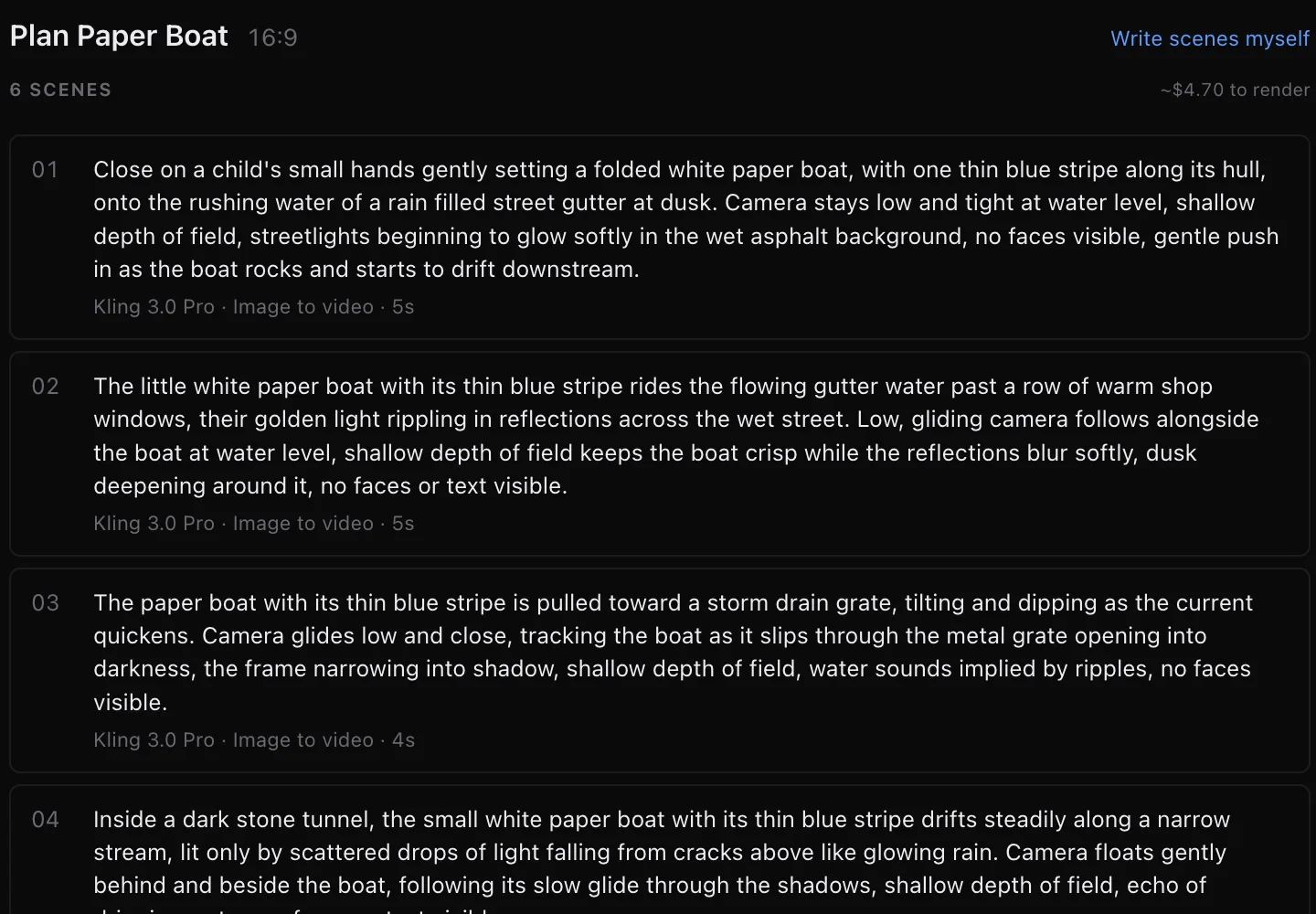
The planner's real proposal for Paper Boat: six scenes on Kling 3.0 Pro, each with its length, and an estimate for rendering them all.

Takes & trims

Keep the take. Trim the rest.

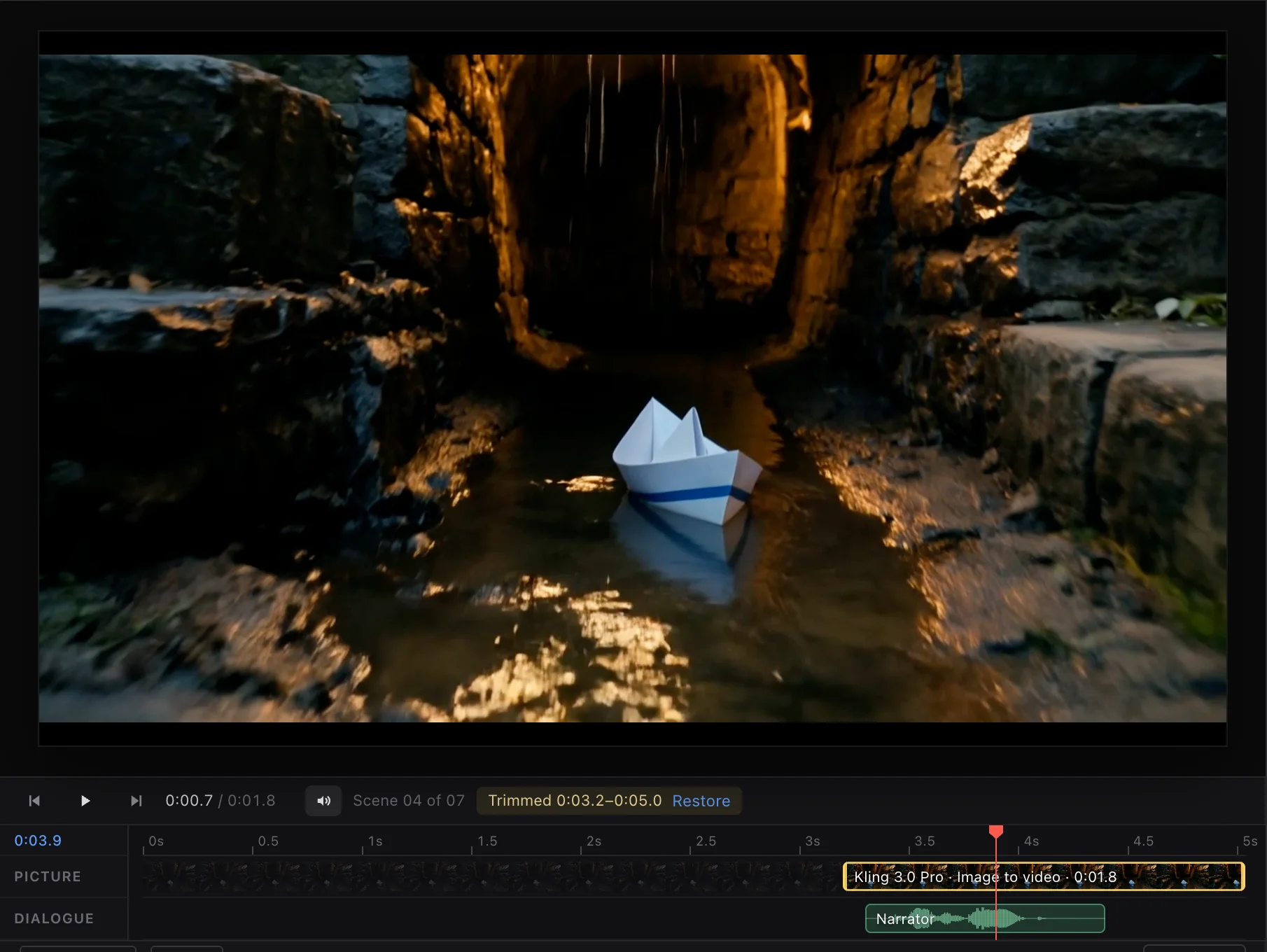
Every scene keeps its takes side by side, like dailies. And a take that wanders doesn't have to be paid for twice: trim it to the tenth of a second, and the part you don't use stays in the file, dimmed, ready to restore. Three shots in the film below were saved this way.

  • Double-click a take to make it the shot
  • The next scene continues from the trimmed out point
  • An interrupted render resumes instead of charging you twice
Scene 4 trimmed to 3.2 to 5.0 seconds: the paper boat in a lamp-lit tunnel, with the unused part of the take dimmed on the timeline and a Restore button.

Voices

One voice per character, in every scene.

FirstTake records dialogue apart from the picture, with a fixed voice for each member of your cast, then mixes it over the shot and keeps the scene's own sound underneath as ambience.

  • Voices from ElevenLabs, MiniMax, Gemini and more
  • Change a line and it's marked out of date, never played stale
  • Drag dialogue on the timeline to time it to the picture
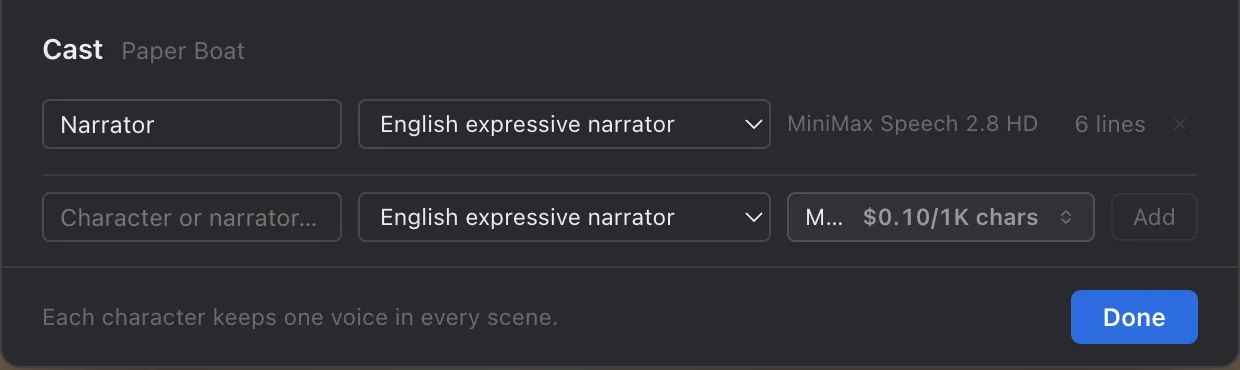
The cast: a Narrator bound to one MiniMax Speech voice, with six lines across the film.
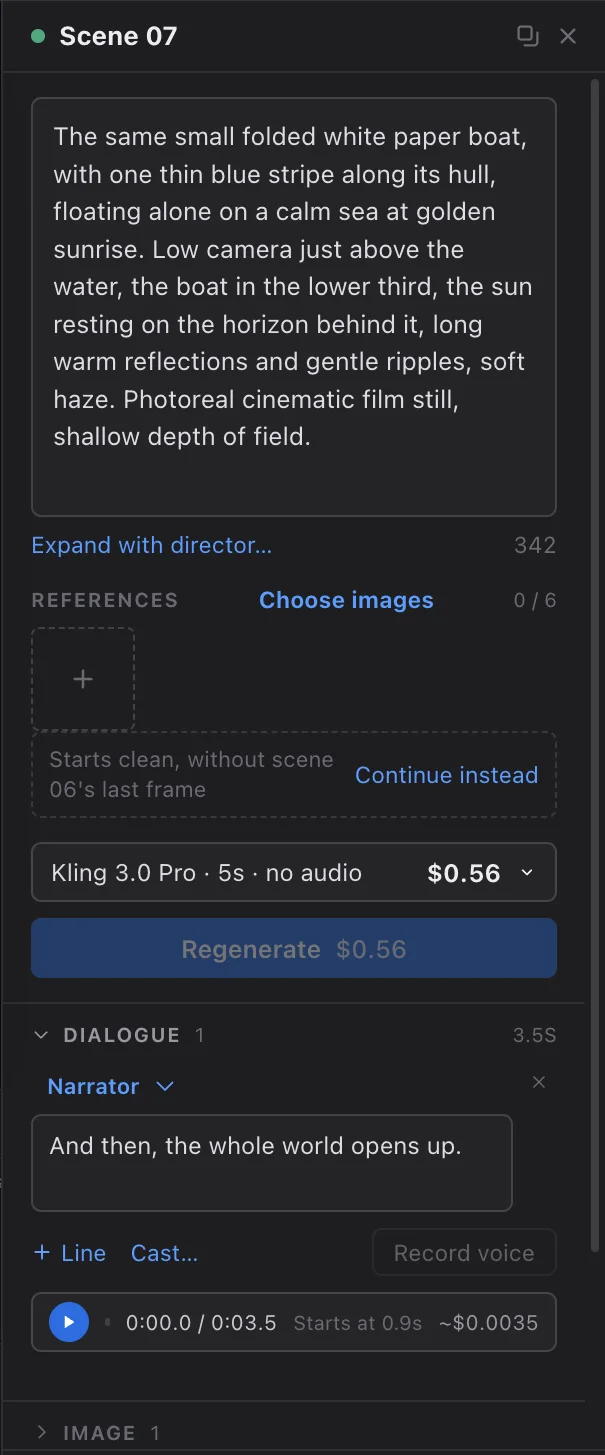
The closing scene's inspector with the narrator's recorded line, 3.5 seconds, starting at 0.9 seconds.

Finish

Titles, trims and transitions. Then one file.

Trim a take to a tenth of a second, drag titles and captions on the scene timeline or right on the picture, add dissolves and wipes between scenes, and export one MP4 with everything burned in.

  • Assembled on your Mac, with no render queue
  • Turn a still into a shot with a slow push, pull or pan, rendered free
  • 9:16, 16:9, 1:1, 4:3 and 21:9 canvases
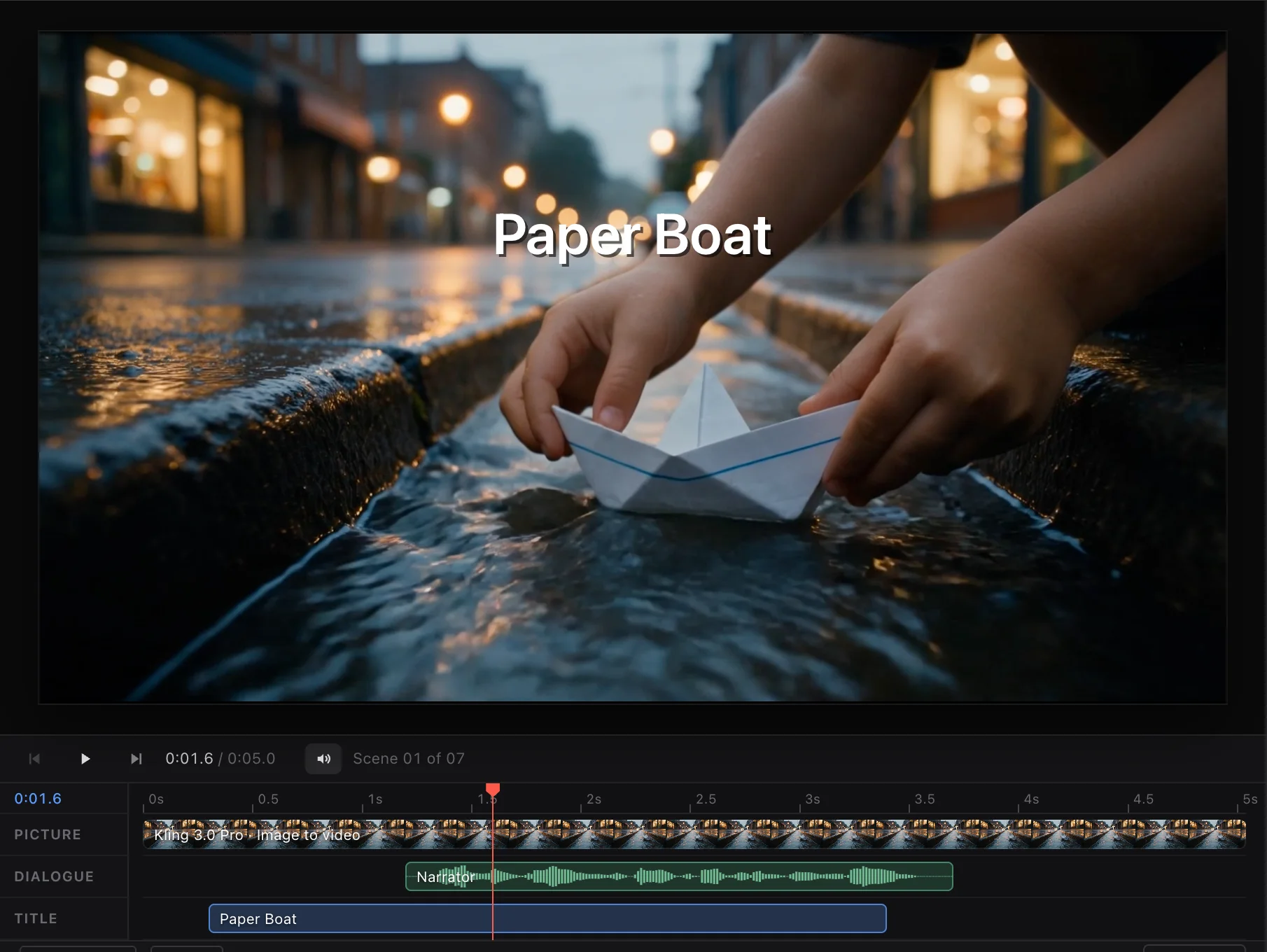
Scene 1 with the title Paper Boat over the picture, and its picture, narrator and title lanes on the scene timeline.

Built for people who ship

The details, handled.

Pay your provider, not us

Bring your own fal.ai, OpenRouter or Higgsfield account. FirstTake never resells credits or marks up a generation.

Every cent accounted for

Each take, still, voice and director call is recorded with what it cost, by scene and by episode, including the takes you didn't use.

Your films are files

A project is a .firsttake document on your Mac. Move it, back it up, share it. Nothing is uploaded to us.

Keys stay in your Keychain

Encrypted on your Mac and only ever sent to the provider they belong to. The window never even sees them.

Series, not one-offs

Episodes share a library of characters, places and props, so a recurring cast looks the same in episode ten as in episode one.

Stills as shots

Generate a still at your canvas and use it as a first frame, or as the shot itself with a slow camera move.

Made in FirstTake

Paper Boat. Made for $3.49.

Start to finish in FirstTake: the director turned a one-paragraph brief into a shot list, Kling 3.0 Pro rendered each shot on OpenRouter from the last one's final frame, a Seedream still became the closing shot, and a MiniMax narrator voiced it. Three shots that wandered were trimmed rather than re-rendered.

Straight from the export, with its title and dissolves. $3.49 of generation, billed by OpenRouter.

How it works

From idea to film in an afternoon.

  1. 1

    Connect your AI account

    Paste a key from fal.ai, OpenRouter or Higgsfield. FirstTake checks it with a free request and keeps it in your Keychain.

  2. 2

    Plan and generate

    Write scenes yourself or let the director plan them. Generate takes, with the cost on the button before you click.

  3. 3

    Pick, polish, export

    Choose the best take of each scene, add voices, titles and transitions, and export one finished MP4.

Pricing

Pay once. Keep it.

No subscription, and no credits to buy from us. You pay your AI provider directly for what you generate, at their own prices.

The first customers get FirstTake for a fraction of its regular price. Each time a tier sells out, the price steps up, and it doesn't come back down.

  1. 1–100First 100$14.99Now
  2. 101–300Next 200$29.99
  3. 301–800Next 500$39.99
  4. After 800Regular price$99.99

Early-bird priceFirstTake for Mac

$14.99 $99.99

One-time payment · save 85%

100 of 100 left at this price · then $29.99

Buy FirstTake · $14.99 Try it free for 3 days
  • Every feature, no tiers
  • Updates, downloaded in the background
  • Commercial use of what you make
  • Works with fal.ai, OpenRouter and Higgsfield
  • Activate on your Mac, move it any time

Secure checkout by Lemon Squeezy. Your licence key arrives by email.

Questions

Good questions, straight answers.

What do I need to use FirstTake?

A Mac running macOS 12 or later (Apple silicon or Intel), and an account with at least one AI provider: fal.ai, OpenRouter or Higgsfield. You paste its API key into FirstTake once. You don't need a separate OpenAI or Anthropic key; the director runs through the same provider.

How much does generating video cost?

Whatever your provider charges; FirstTake adds nothing on top. The price of every take is shown on the Generate button before you click, the director's plan shows the whole episode's estimate, and every request is recorded with its cost afterwards.

What's in the free trial?

Three days with everything unlocked, with two limits: an episode can hold up to two scenes, and exported films carry a small "Made with FirstTake" mark in the corner. Buy a licence at any point and both go away, with your projects just as you left them.

Is this a subscription?

No. You pay once and FirstTake is yours, with updates downloaded in the background. The only ongoing cost is what you choose to generate with your own AI provider.

Why does the early-bird price go up?

The first 100 customers pay $14.99, the next 200 customers pay $29.99, the next 500 customers pay $39.99, and after that FirstTake is $99.99. It rewards the people who back it first. The count on this page is live.

Can I use what I make commercially?

Yes. FirstTake's licence covers personal and commercial work. What you generate is also subject to your AI provider's terms and the terms of the model you used, so check those for your use.

Where do my projects and keys live?

On your Mac. Projects are ordinary files you can save anywhere, and keys are encrypted with your Keychain. Your prompts, reference images and dialogue go only to the AI provider you picked, to make your shots.

Can I move my licence to a new Mac?

Yes. Choose Deactivate this Mac in FirstTake's Licence window, then activate the same key on the new one.

Is there a Windows version?

Not yet. FirstTake is built for macOS first.

Your next film starts with a first take.

100 of 100 left at $14.99. Try it free for three days, or own it today.

Try free Buy · $14.99